

This will require editing the registry.
Run Your Registry Editor.
Run a backup if your editor has it.
Navigate through the following sections (keys)
HKEY_Local_Machine
Software
Microsoft
Internet Explorer
AboutURLs
Press the "Values" button and edit the 3 values that have the word "Home" in them from whatever web address they have in them to http://www.google.com (if google is your chosen homepage as an example).
Press Done when complete.
Showing posts with label Browsers. Show all posts
Showing posts with label Browsers. Show all posts
Thursday, January 10, 2008
How To Change the Homepage on Internet Explorer of your Motorola Q


Wednesday, January 9, 2008
Yahoo Go! - Yahoo Mail, Flickr and more on your Motorola Q

For those of you that have yahoo as the center of your internet universe, Yahoo Go is a very nice little mobile application.
The application offers all Yahoo brand services such as Mail, Flickr, Search, Maps, Weather and various news feeds. My main mailbox is yahoo mail so this was the reason I added this app as it offers the near full Yahoo mail experience with ability to get to all your mail folders and contacts. There is also a synching feature to synch your yahoo contacts to your phone contacts.
Outside of this, I am not much of a Flickr user (not requiring mobile access at least) but the interface is slick. Yahoo weather is about the only other feature I could see myself using but that is a "once in a blue moon" feature.
I get my news from elsewhere.
Nevertheless, If you are a Yahoo mail user, this is a superior mail interface for your yahoo account than the windows mobile standard one you get with the phone - so it is worth it for that.
Version 3.0 is just out so I will add a new review or update this one soon.
Conduits Pocket Player - Make your Motorola Q into a Full Featured MP3 Player

Conduits offers full function media player called Pocket Player. It handles playing audio files including MP3, videos, podcasts and offers an onboard search and webguide.
For the purposes of this test and review, I am going to emphasize the MP3 player aspect of the application.
The browser screen (shown left) gives you a good idea of how this application is used and has a similar user interface to most MP3 players we know.
Browsing is fast and organized as you would hope.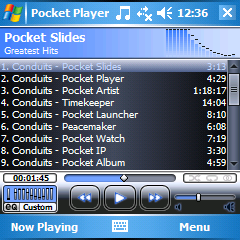 Once the player screen comes up based upon your selection, all is familiar and pretty obvious with the direction buttons handling most of the work. Up/Down handles volume and Left/Right handles moving through the songs. All these buttons can be remapped to customize the player fully to your needs.
Functionally, this application offers spectacularly more functionality with abilities to add plug-ins, alter appearance via skinning, full graphic equalizer and built in browser to search all manner of media including podcasts. The screenshot page will give you an excellent summary of the scope of this application.
Overall this is a stellar, professional application and fully deserving of the $19.95 price tag (at the time of writing this). There is a 30 Day demo so you can check it out for yourself.
Opera Mini Browser - A Better Browser for your Motorola Q
 Opera mini is an alternative browser to the installed Internet Explorer (IE) browser standard on Windows Mobile.
The first thing you will need in order to install this browser is a java tool. I use Esmertec JBed which can be found here.
Install this and then go to the Opera mini website. Install as per normal procedure.
The first thing you will notice with this browser as compared to IE is the noticeable increase in speed of surfing and by pressing the back button, you notice an almost instantaneous return to the previous page.
Version 4 of Opera mini offers the ability to view your page in portrait or landscape mode with the pressing of 2 buttons.
 Opera offers an excellent online interactive demo here to show you exactly how the browser will run on your phone.
Images here taken from the Opera mini demo page.
Also of note is the handling of viewing images. The browser has a zoom function which allows you to see the image in full screen or in a closeup.
The browser does allow skinning so you can adjust the appearance.
Overall Opera mini wins on almost all categories over IE for me with the only exception of having to load the Java app as an extra button press to load it.
Subscribe to:
Posts (Atom)
